Blog
Perklist offers an interactive menu that improves your guest experience
The menu capabilities within Perklist offer you more flexibility in showcasing your dishes and helping guests with their meal choice selection. You can choose to show all your menu options, just your specials, or even offer hidden menus only available to certain people or at certain times.
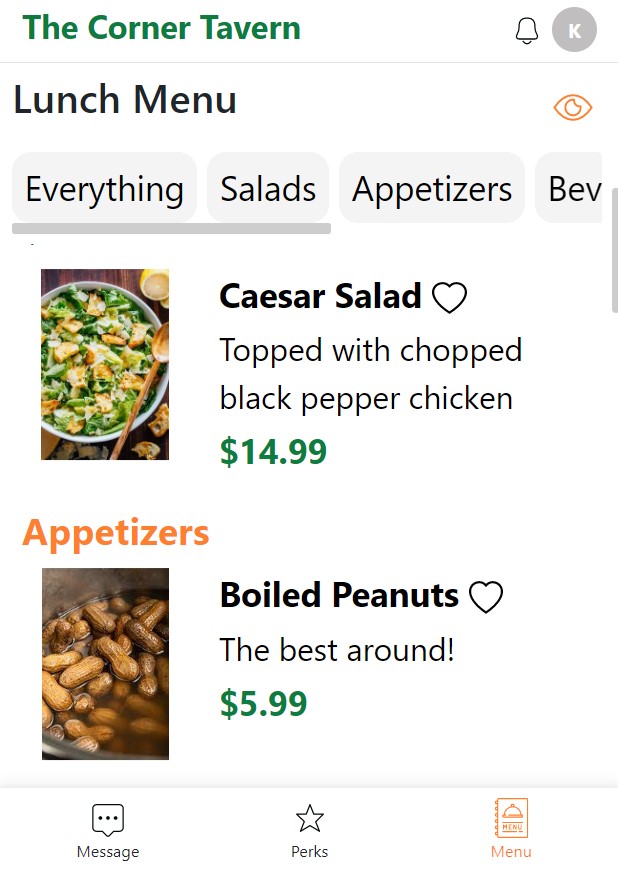
Guests can easily scan the menu, search for specific items, mark options for quick comparisons, and save favorites for future visits. Setting up your menu items and pictures is easy, and businesses that aren’t restaurants can use these features to display other products and services.
Guest experience: - After a guest scans a QR Code, they are greeted with an interactive mobile experience.
This experience offers guests several benefits over traditional menus:
Configuration and setup: To create new menus for your guests, log into your account and navigate to the Menu section in the top navigation bar. From here, you can create your first menu.
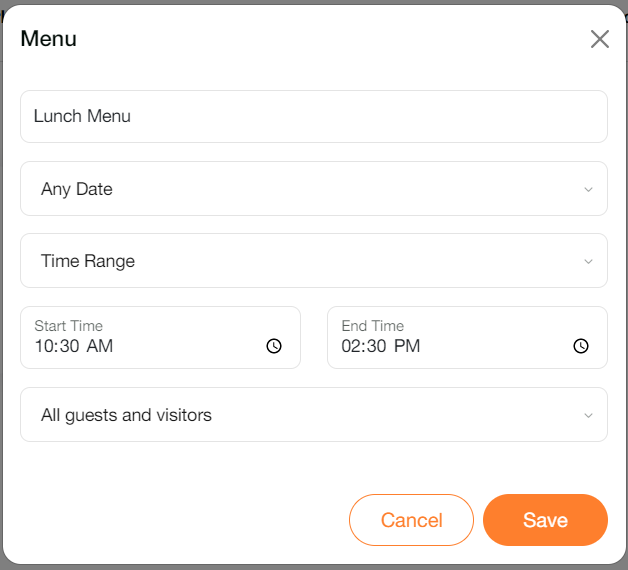
You can add a simple menu that is available for all guests at all times, or utilize the menu options to customize the viewing availability:
After creating a menu, it’s simple to add your individual menu items. Select the option to add a new item and enter the item name and description. Only the name and description are required, but you have the option to choose a menu category, price, and upload a picture.
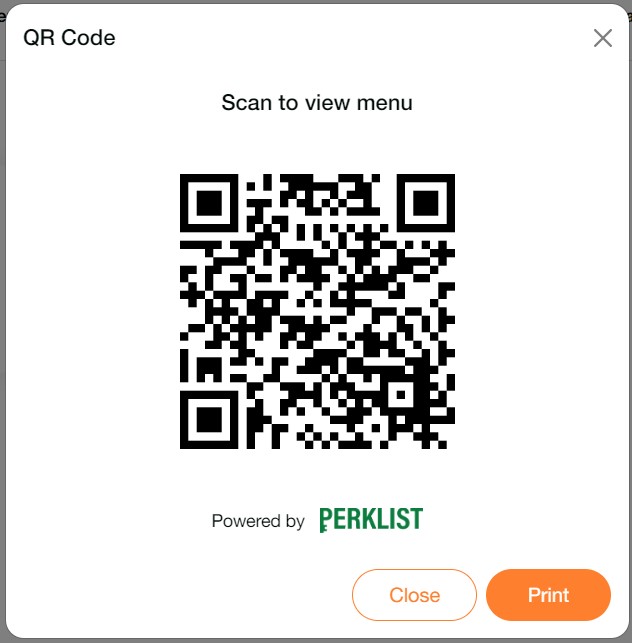
To share the menu, navigate to the Menu section in the top navigate bar and select the QR Code option. This generates a unique QR Code that could be displayed digitally or printed and left for guests to scan.
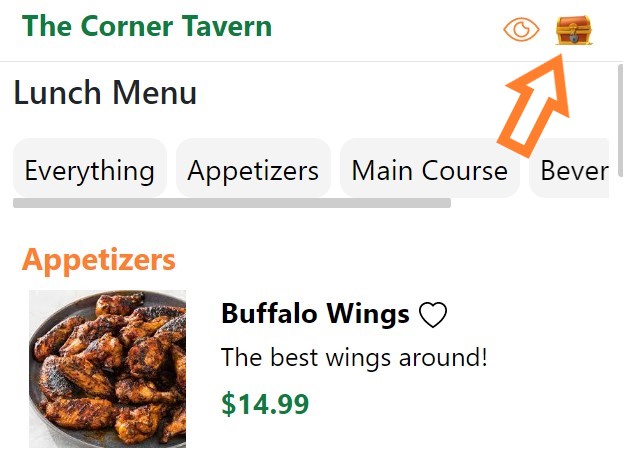
If you would like guests to have the option of joining your Perklist account from the menu, you can easily enable this through your Invite Options. Navigate to your Profile section > select Invite Options > and enable the menu. When enabled, guests will see a treasure chest icon that displays on the menu. They can select this, view your customized message, and join your Perklist account.
Create a delightful interactive menu experience for guests and build your Perklist account through guest signups. To learn more or schedule a demonstration, please contact our team at support@perklist.com.
Guests can easily scan the menu, search for specific items, mark options for quick comparisons, and save favorites for future visits. Setting up your menu items and pictures is easy, and businesses that aren’t restaurants can use these features to display other products and services.
Guest experience: - After a guest scans a QR Code, they are greeted with an interactive mobile experience.
This experience offers guests several benefits over traditional menus:
- Menu navigation: Easy navigation between menu items and categories to allow guests to search for items based on categories.
- Favorites: The option to mark items as favorites to easily compare menu options or save items to remember for future purchases.
- Font size: Increase the font size of the menu so it is easier to read.
- Hidden items: Join your loyalty program to view hidden menu items not available to the general public.
Configuration and setup: To create new menus for your guests, log into your account and navigate to the Menu section in the top navigation bar. From here, you can create your first menu.
You can add a simple menu that is available for all guests at all times, or utilize the menu options to customize the viewing availability:
- Date: Set the menu to be available on any date, or customize this option to restrict the menu to only show on specific days. This can be used to create Daily Specials, seasonal menus, or weekday vs. weekend options.
- Time: Menus can be available any time of the day, or you can restrict menus to only display during specific times. This can be used for meal specific menus such as lunch and brunch menus or for happy hour specials and other options.
- Audience: Choose whether a menu is available to all guests, or restrict specific menus to only show for loyalty members, specific levels, or a custom selection of guests.
After creating a menu, it’s simple to add your individual menu items. Select the option to add a new item and enter the item name and description. Only the name and description are required, but you have the option to choose a menu category, price, and upload a picture.
To share the menu, navigate to the Menu section in the top navigate bar and select the QR Code option. This generates a unique QR Code that could be displayed digitally or printed and left for guests to scan.
If you would like guests to have the option of joining your Perklist account from the menu, you can easily enable this through your Invite Options. Navigate to your Profile section > select Invite Options > and enable the menu. When enabled, guests will see a treasure chest icon that displays on the menu. They can select this, view your customized message, and join your Perklist account.
Create a delightful interactive menu experience for guests and build your Perklist account through guest signups. To learn more or schedule a demonstration, please contact our team at support@perklist.com.
Perklist improves a variety of guest experiences through QR Codes
Within the last couple years, we’ve all seen the expansion of QR Codes being used in our favorite restaurants. These codes connect our mobile devices with the restaurant experience and save guests time from having to manually search and open a webpage.
Perklist offers a user-friendly QR Code experience where these codes can be used to share menus, collect guest feedback, or allow guests to join your loyalty program and receive benefits and perks.
These features were built after interviewing countless guests and solve common challenges we heard like eliminating the need to “pinch and zoom” when viewing a digital menu. Here’s more on how it works.
Interactive Menus:
Perklist offers a simple tool for creating interactive menus that increase customer loyalty and engagement. Guests can view these menus by scanning a QR Code, visiting your website, or through the Perklist mobile app. Special options like offering “Hidden Menus” only available to specific guests allow you to create a new level of customer loyalty.
To start offering this interactive menu experience to your guests, simply print the digital menu QR Code provided within the Menu section in Perklist. Visit here to learn more about the interactive menu experience within Perklist.
Private Feedback:
Collect private guest feedback and prevent negative online reviews through simple customer feedback tools. Perklist offers a variety of simple feedback capabilities optimized for the guest experience and mobile devices.
Surveys can be viewed by guests by visiting a custom URL or by scanning a QR Code that could be printed and left at common areas such as tables or registers. Restaurants have the opportunity to customize the survey, and the experience is optimized for guests on their mobile devices.
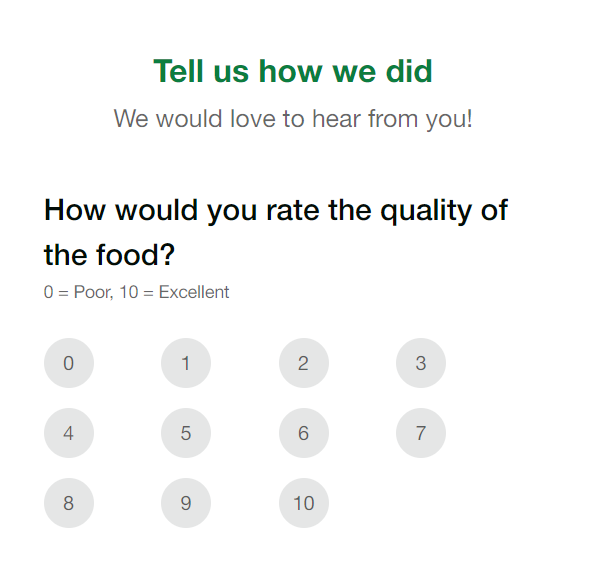
After submitting their survey, guests have the option to join your Perklist account to receive special benefits and offers. As a restaurant, this also gives you the option to further engage with these guests. Visit here to learn more about the guest feedback capabilities within Perklist.
Receive perks and special offers:
What options does Perklist provide to help you extend hospitality to your guests? The core benefits you share with guests are known as Perks and can be found in the top navigation bar.

Perks are simple to create and customize for your restaurant. Visit here to learn more about our different perk configuration options.
To join your account, Guests can scan a QR Code with their mobile devices. This will link them to your account and give them access to their perks.
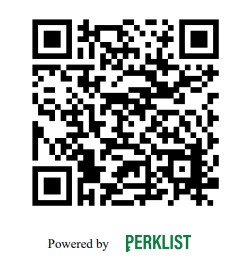
We plan to add more options that leverage QR Codes in the future and allow you to quickly invite guests from your mobile device or offer them a code they can scan to receive a special perk or benefits.
Visit here to learn more about Perklist or try it out with our two week free trial.
Perklist offers a user-friendly QR Code experience where these codes can be used to share menus, collect guest feedback, or allow guests to join your loyalty program and receive benefits and perks.
These features were built after interviewing countless guests and solve common challenges we heard like eliminating the need to “pinch and zoom” when viewing a digital menu. Here’s more on how it works.
Interactive Menus:
Perklist offers a simple tool for creating interactive menus that increase customer loyalty and engagement. Guests can view these menus by scanning a QR Code, visiting your website, or through the Perklist mobile app. Special options like offering “Hidden Menus” only available to specific guests allow you to create a new level of customer loyalty.
To start offering this interactive menu experience to your guests, simply print the digital menu QR Code provided within the Menu section in Perklist. Visit here to learn more about the interactive menu experience within Perklist.
Private Feedback:
Collect private guest feedback and prevent negative online reviews through simple customer feedback tools. Perklist offers a variety of simple feedback capabilities optimized for the guest experience and mobile devices.
Surveys can be viewed by guests by visiting a custom URL or by scanning a QR Code that could be printed and left at common areas such as tables or registers. Restaurants have the opportunity to customize the survey, and the experience is optimized for guests on their mobile devices.
After submitting their survey, guests have the option to join your Perklist account to receive special benefits and offers. As a restaurant, this also gives you the option to further engage with these guests. Visit here to learn more about the guest feedback capabilities within Perklist.
Receive perks and special offers:
What options does Perklist provide to help you extend hospitality to your guests? The core benefits you share with guests are known as Perks and can be found in the top navigation bar.
Perks are simple to create and customize for your restaurant. Visit here to learn more about our different perk configuration options.
To join your account, Guests can scan a QR Code with their mobile devices. This will link them to your account and give them access to their perks.
We plan to add more options that leverage QR Codes in the future and allow you to quickly invite guests from your mobile device or offer them a code they can scan to receive a special perk or benefits.
Visit here to learn more about Perklist or try it out with our two week free trial.
Perklist integration improves the Waitlist Me self-scheduling experience
Waitlist Me has a set of self-scheduling features that make it easy for customers to book online reservations at businesses or add themselves to their waitlists. All a business needs to do is add the Waitlist Me widget to their website.
In some cases, businesses may want to have more control over who has access to these features for various reasons. They may only want to make reservations available to locals or they may want to let their best customers skip the line. Or they may just want to decrease the number of people that don’t show up on time or at all by adding in a little more accountability. Whatever the case, Perklist’s integration with Waitlist Me gives businesses more flexibility in serving customers better while keeping things simple for their customers. Here’s more on how it works.
Guest experience: Guests have a simple view where they can see how many people are waiting and join the waitlist or make reservations. Once guests choose an option in Perklist, their information is pre-populated and they can add their party size along with any other relevant information.
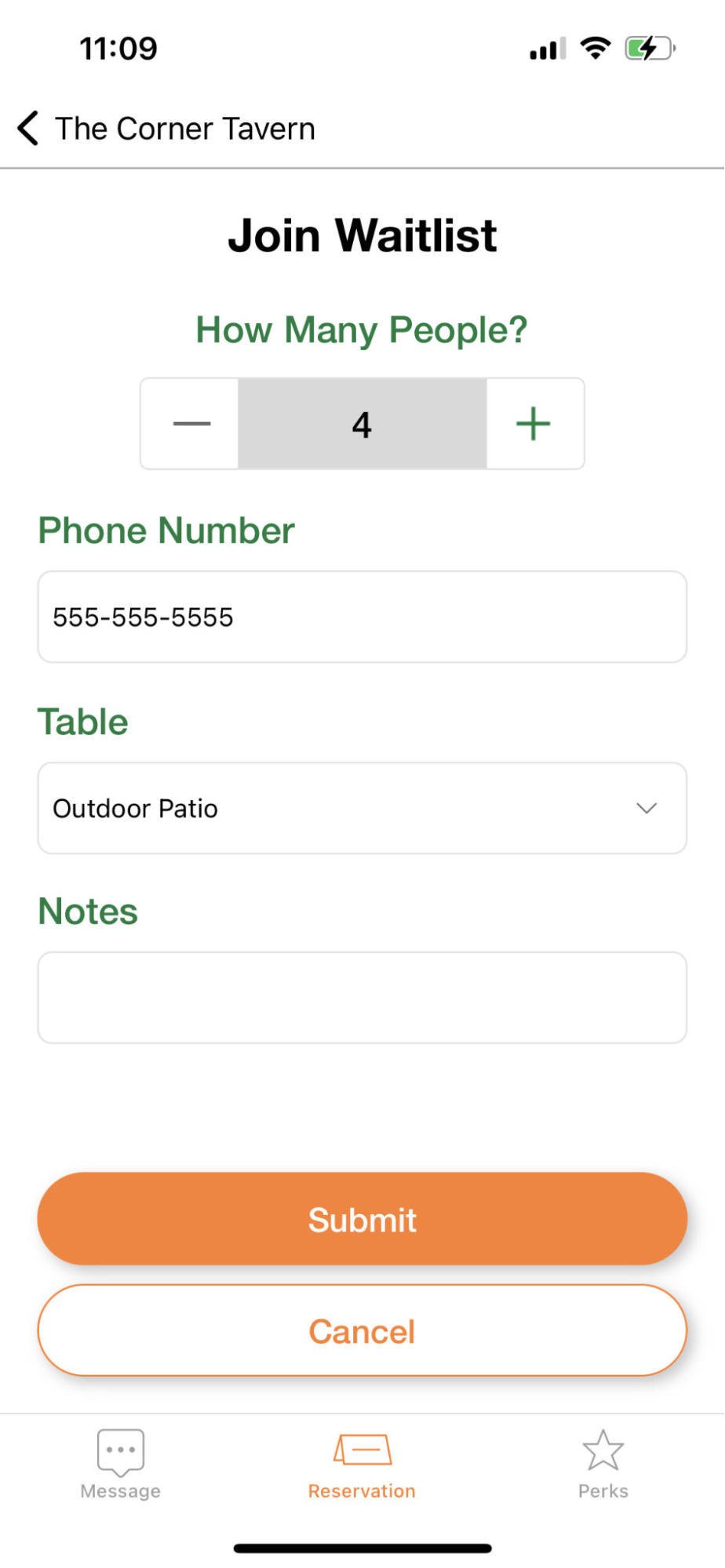
Guests can immediately see when their waitlist request is submitted and be updated once it is approved. As a business, you can choose whether to move guests up your waitlist to “skip the wait,” or slot them into the regular waitlist.
For reservations, guests have a simple way to make new reservations and view a history of their previous visits. They can also have options to pick specific tables or sections, depending on your assignment settings within Waitlist Me.
As Perklist was created by the same team as Waitlist Me, it is only natural that we’d have some parts of both services that work better together and solve challenges we have heard over the years. And we are just getting started.
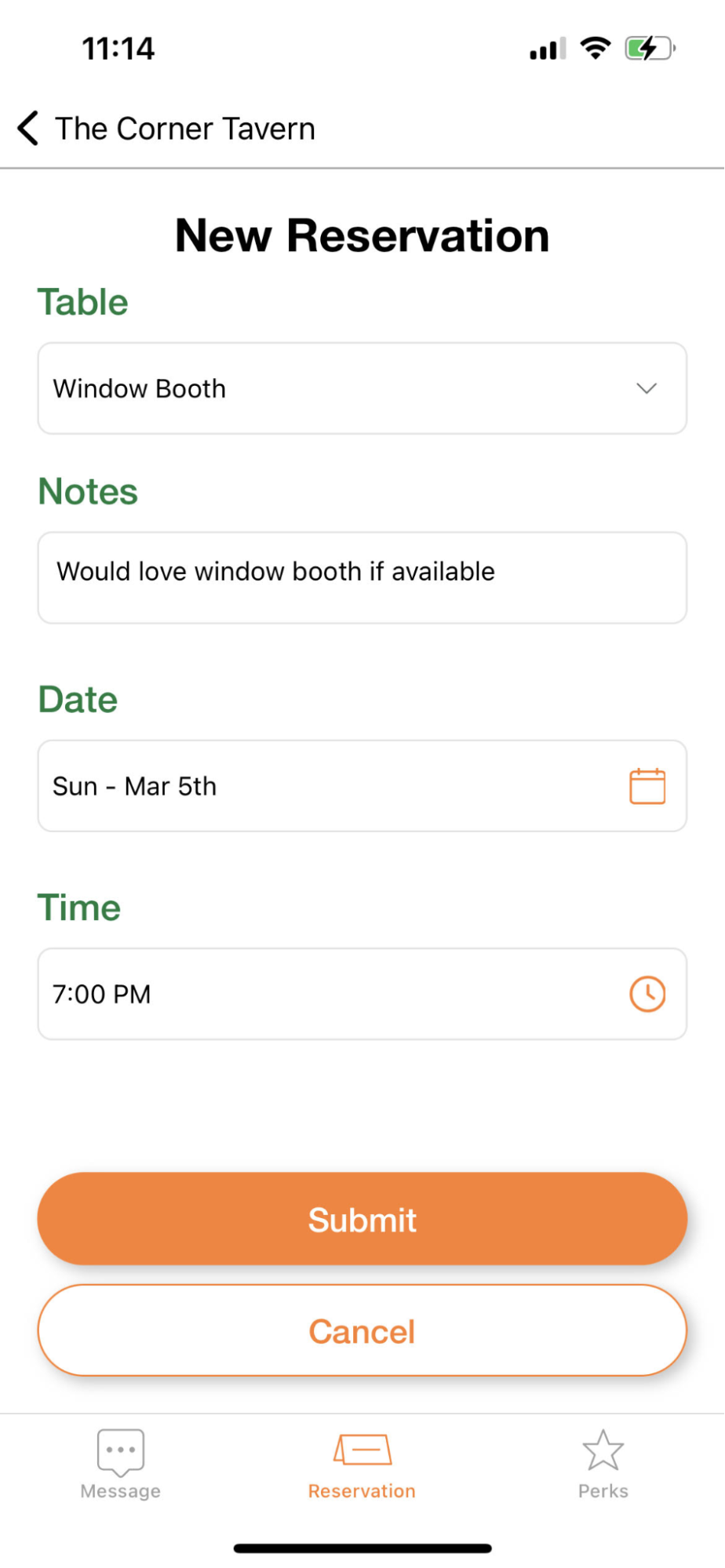
Waitlist Me: All your approval rules and web widget settings will be respected, including party size restrictions, business hours, input fields, and label customizations.
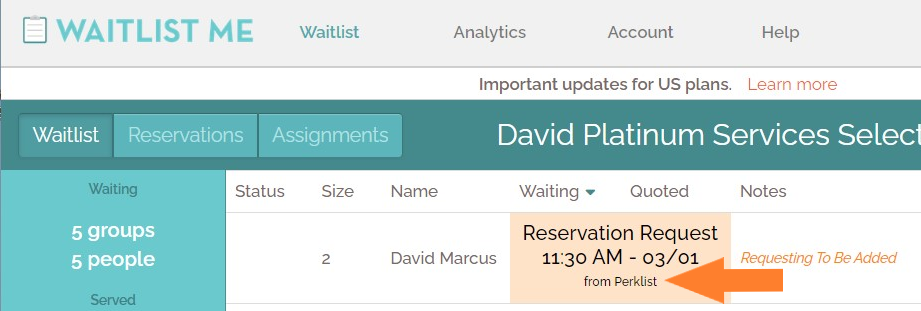
Reservation and waitlist requests have a Perklist tag, so you can see where these requests are coming from inside the Waitlist Me interface.
It’s simple to link your Waitlist Me account with Perklist. After logging in to your Perklist account go Profile > Waitlist Connection. Here you can enter your Waitlist Me login credentials to link your account.
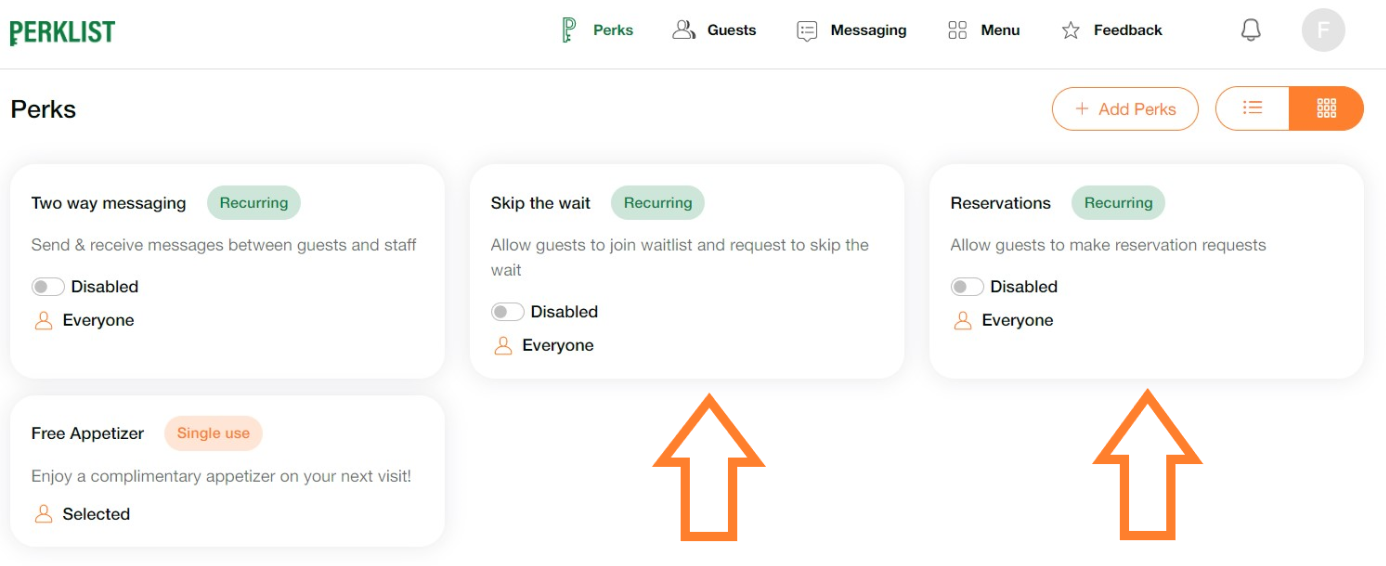
Once your account is linked, you will notice two additional Perks. These perks are disabled by default so you can enable them and choose which guests can access these benefits.
In some cases, businesses may want to have more control over who has access to these features for various reasons. They may only want to make reservations available to locals or they may want to let their best customers skip the line. Or they may just want to decrease the number of people that don’t show up on time or at all by adding in a little more accountability. Whatever the case, Perklist’s integration with Waitlist Me gives businesses more flexibility in serving customers better while keeping things simple for their customers. Here’s more on how it works.
Guest experience: Guests have a simple view where they can see how many people are waiting and join the waitlist or make reservations. Once guests choose an option in Perklist, their information is pre-populated and they can add their party size along with any other relevant information.
Guests can immediately see when their waitlist request is submitted and be updated once it is approved. As a business, you can choose whether to move guests up your waitlist to “skip the wait,” or slot them into the regular waitlist.
For reservations, guests have a simple way to make new reservations and view a history of their previous visits. They can also have options to pick specific tables or sections, depending on your assignment settings within Waitlist Me.
As Perklist was created by the same team as Waitlist Me, it is only natural that we’d have some parts of both services that work better together and solve challenges we have heard over the years. And we are just getting started.
Waitlist Me: All your approval rules and web widget settings will be respected, including party size restrictions, business hours, input fields, and label customizations.
Reservation and waitlist requests have a Perklist tag, so you can see where these requests are coming from inside the Waitlist Me interface.
It’s simple to link your Waitlist Me account with Perklist. After logging in to your Perklist account go Profile > Waitlist Connection. Here you can enter your Waitlist Me login credentials to link your account.
Once your account is linked, you will notice two additional Perks. These perks are disabled by default so you can enable them and choose which guests can access these benefits.
Launching Perklist
Today we are publicly announcing we’ve launched the first toolkit to help restaurants engage with their guests in an authentic way.
It's called Perklist.
What do we mean by authentic engagement?
Perklist comes with mobile apps for your guests and is a powerful toolkit to extend the great hospitality you’re already providing today. To provide a few examples:
Do you have slower times at your restaurant? Quickly send a push notification to your favorite guests that includes an interactive message and expiring offer.

Or create hidden menu items to test out new dishes and give certain guests an exclusive experience.

Be creative and ask guests to engage in unique ways to receive their rewards. Guests can open their mobile app and view these perks in real time.

Our journey with Perklist has just begun and these are just a few examples. We see many opportunities to extend the functionality and value Perklist can provide to help businesses drive authentic engagement with their guests in new ways.
Perklist is a service developed by Waitlist Me, which has a long history of developing tools for small businesses that are easy to use, flexible, and deliver exceptional value.
Drive more visits, provide better service, and build stronger guest relationships by leveraging Perklist and extending the great hospitality you’re already providing today. Perklist offers several tools you can start using right away! Zero implementation required.
Visit here to learn more about Perklist or try it out with our two week free trial.

It's called Perklist.
What do we mean by authentic engagement?
- Creative benefits and rewards that are flexible and match your brand and processes
- Conversations with videos, images, and text
- Feedback loops through interactive surveys
- Hidden menu items
- Options like skipping the wait, special reservations
- And more…
Perklist comes with mobile apps for your guests and is a powerful toolkit to extend the great hospitality you’re already providing today. To provide a few examples:
Do you have slower times at your restaurant? Quickly send a push notification to your favorite guests that includes an interactive message and expiring offer.
Or create hidden menu items to test out new dishes and give certain guests an exclusive experience.
Be creative and ask guests to engage in unique ways to receive their rewards. Guests can open their mobile app and view these perks in real time.
Our journey with Perklist has just begun and these are just a few examples. We see many opportunities to extend the functionality and value Perklist can provide to help businesses drive authentic engagement with their guests in new ways.
Perklist is a service developed by Waitlist Me, which has a long history of developing tools for small businesses that are easy to use, flexible, and deliver exceptional value.
Drive more visits, provide better service, and build stronger guest relationships by leveraging Perklist and extending the great hospitality you’re already providing today. Perklist offers several tools you can start using right away! Zero implementation required.
Visit here to learn more about Perklist or try it out with our two week free trial.